
How to add a link in your Instagram bio
·4 min read
To add a link to your Instagram bio, go to your profile, tap Edit profile, tap Links, then Add external link, paste your URL and save. Unlike TikTok, Instagram gives every account this option with no follower requirement, and it currently supports up to five links.
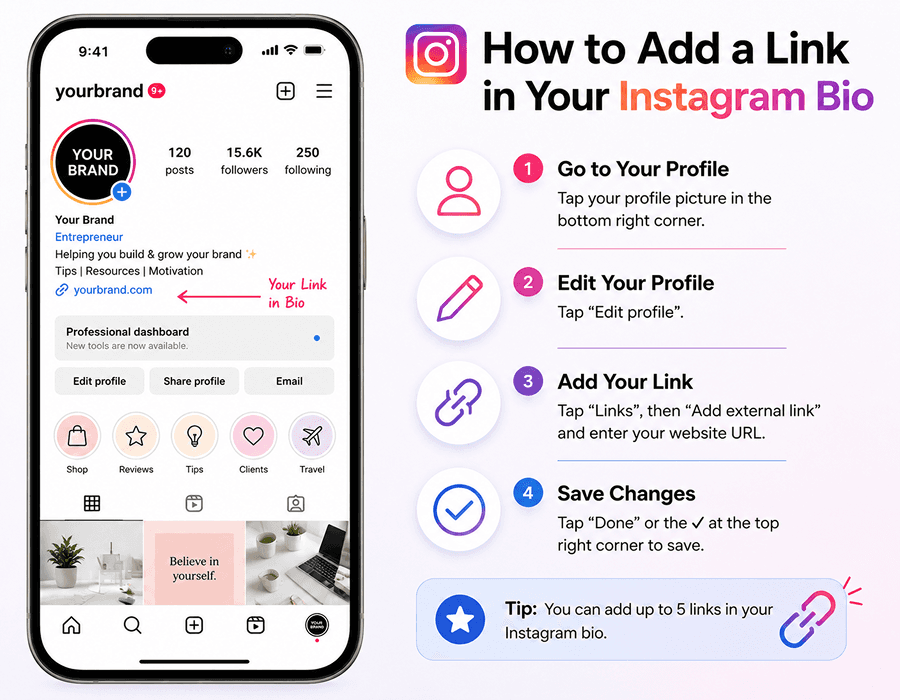
Adding your first link
- Open Instagram and go to your profile.
- Tap Edit profile.
- Tap Links, then Add external link.
- Paste your URL. Add a display title if you want something friendlier than the raw address.
- Tap Done, then save your profile.
Every account can do this. There's no follower threshold and you don't need a Business or Creator account, which is the main way Instagram differs from TikTok.
Adding more than one link
Instagram supports up to five links in the same Links panel. Repeat the Add external link step for each one and drag to reorder. They appear stacked under your bio, with the first one shown and the rest behind a tap.
That extra tap is the catch. Anything below the first link gets meaningfully fewer clicks, and you have no way of knowing which ones people actually use, because Instagram doesn't show you per-link data.
Why most people still use a bio link page
Native multi-link support covers the basics, but a dedicated page does three things it can't:
- Shows every destination at once, laid out and labeled, instead of hiding most of them behind a tap.
- Tells you what people click, so you can drop the links nobody uses and promote the ones they do.
- Captures contact details. A link page with an email field or a short enquiry form turns a visitor into someone you can reach again, which a raw outbound link never does.
There's a practical benefit too: you edit the page rather than your Instagram profile. If you're changing what you promote weekly, editing one page beats going through Edit profile every time, and the same URL can serve your TikTok and YouTube bios at once.
Common problems
- Link not clickable: a URL typed into the bio text is plain text. It must go in the Links panel.
- Link rejected: check the full address including https://, and that the page actually loads in a browser.
- Link missing after saving: back out of your profile and reopen it. The panel sometimes needs a refresh.
- Shortened links flagged: some URL shorteners get blocked. Use the direct address or your own bio page URL instead.
Making one link do more
If you want a page rather than a bare link, Blyn's is free. Build it in the editor without signing up, publish at useblyn.com/@yourname, then paste that into your Instagram Links panel. Unlimited links, social icons, a featured video, email capture, lead forms, click analytics and a QR code are all on the free plan. Most templates show a small "Made with Blyn" badge in the page footer.
Build your free page in about a minute
Unlimited links, lead capture, click analytics and a QR code, all on the free plan.
Try it free