
How to put a link in your TikTok bio
·4 min read
To add a clickable link to your TikTok bio, open your profile, tap Edit profile, then tap the Website field (labeled "Add link" in some versions of the app) and enter your URL. That field only appears on Business accounts, and on Personal accounts that have reached 1,000 followers, if you don't see it, switching to a Business account is the fastest fix and it's free.
Who can add a link to their TikTok bio
TikTok doesn't give every account a clickable bio link. The Website field shows up in two situations: you have a Business account, or you have a Personal account that has passed roughly 1,000 followers. Business accounts are free and you can switch in under a minute, which is why most people who want a bio link just switch rather than waiting to hit the follower threshold.
It's worth knowing the trade-off before you switch. Business accounts get the link field and access to analytics, but they have a more limited commercial music library. If your videos lean heavily on trending audio, that restriction is the thing to weigh up.
How to add the link
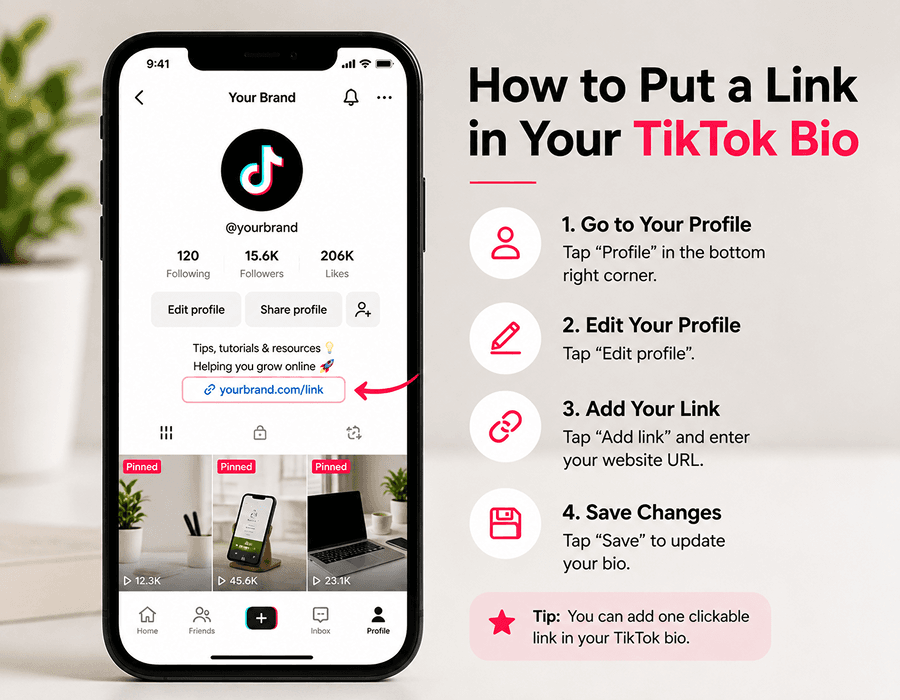
- Open TikTok and tap Profile in the bottom-right corner.
- Tap Edit profile.
- Look for the Website field. Depending on your app version it may be labeled "Add link" instead. Tap it, paste your URL and tap Save.
- If neither option is there, you don't qualify yet. Switch to a Business account using the steps below, then come back to this screen.
Switching to a Business account
- Tap the menu icon in the top-right of your profile, then Settings and privacy.
- Tap Account, then Switch to Business Account.
- Pick the category that best describes you and confirm.
- Go back to Edit profile. The Website field should now be available.
You only get one link. Make it count
This is the real constraint. TikTok gives you a single URL, so pointing it straight at your homepage means everything else you do is invisible: your shop, your booking page, your latest video, your newsletter, the thing you actually mentioned in the video someone just watched.
The standard fix is a link in bio page. One URL that opens a mobile page holding all your links. You update the page instead of editing your TikTok bio every time something changes, which matters because you'll otherwise be editing that field constantly.
There's a second reason it's worth doing properly. Traffic that lands on a link page and bounces straight out to another platform gives you nothing you keep. A page that also captures an email address, or takes an enquiry through a short form, turns a viewer into a contact you own rather than a click you rented.
What to do if your link isn't clickable
A few things commonly go wrong:
- The URL is in your bio text rather than the Website field. Text in the bio description is not clickable. It has to go in the dedicated field.
- The URL is missing its prefix. Include the full address starting with https:// so TikTok recognizes it.
- You switched account types but didn't reopen Edit profile. Back out of the screen and go in again.
- The link is under review. New links occasionally take a short while to become active, particularly on new accounts.
Setting up a bio link page
If you want one, Blyn's is free: you build it in the editor without an account, publish at useblyn.com/@yourname when you're happy, and paste that URL into the TikTok Website field. You get unlimited links, social icons, a featured video, email capture, a lead form, click analytics and a downloadable QR code on the free plan. Most templates carry a small "Made with Blyn" badge in the page footer.
Build your free page in about a minute
Unlimited links, lead capture, click analytics and a QR code, all on the free plan.
Try it free